
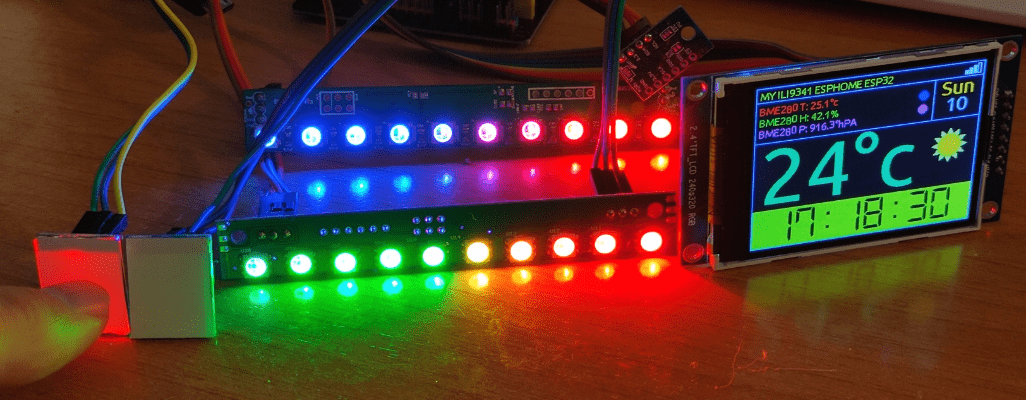
That is, as in “trials and tribulations”. I’m busy getting myself familiar with the ESP32 and ESPHOME to see how far I can push these devices now that the price is not a LOT more than the ESP8266.
Regular readers will know that years ago I and others developed “ESP-GO”, firmware to get the best out of the incredibly popular ESP8266 WiFi microcontrollers. I took a few wrong turns there, including avoiding the Arduino framework (the libraries therein tend to be bulky BUT that route has incredible support) which meant I could focus on my core strength – C – and that meant modifying just about every library out there… anyway that’s history – enough.
When I hit on ESPHOME (not to be confused with HOME ASSISTANT) only weeks ago, I started a re-think. I have a number of ESP-32 boards so I got myself a KeyeStudio “shield” or baseboard primarily because typical ESP32 boards have so few ground and 3v3 pins making R&D painful.

I’ve been using Tasmota firmware for a long time now with ESP8266, avoiding ESP32 like the plague because it cost so much more and so it seemed at the time, not providing a LOT more power (unless you need Bluetooth which I don’t).
I’ll be working on this for months but several things have come out of this so far. I’m into WS2812B RGB displays as I LOVE pretty colours. WLED firmware (if you don’t know what that is – look here) can handle incredibly smooth rainbows using these lserial LEDs (hundreds of them) on a lowly ESP8266 (for clarity I run mine on 3v3, get great brilliance and need NO level shifting or other hardware to run them). The ONLY issue with WLED is – that’s what it does – runs a strip of ws2812b – end of story – no buttons on the other IO pins, nothing.

Tasmota can run LCD and OLED displays as well as ws2812b lighting and is improving all the time, but right now on displays particularly, ESPHOME seems to have the edge, with a possible caviat. I just spent an entire day struggling with ESPHOME on an ESP8266, running a strip of 10 ws2812b lights and a display and getting visual juddering on the ws2812b LEDs.
I read various items on the web about hardware limitations and other excuses. so I dug into this one deeply. I ended up with an ESP8266 board doing nothing more than controlling a couple of relays (lighting) and running a strip of ws2812b LEDs in rainbow mode on the otherwise unused ESP8266 RX pin. The ESPHOME online documentation includes this mode “ESP8266_DMA (default for ESP8266, only on pin GPIO3)” bearing in mind that GPIO3 is serial RX. BEAUTIFUL. But if I tried to run any kind of display, the rainbow still started to fall apart. Ok, limitation accepted.

SO, on advice from one of the guys in the ESPHOME DISCORD forum, I switched to ESP32 and there things started to unravel.
First things first, my handy KeyeStudio shield isn’t QUITE as handy as it looks as various ESP32 boards have different WIDTHS (I already knew there were ESP32-based boards with differing number of pins) so any chance of a universal shield is OUT. However by careful selection of ESP32 boards.. they are not all the same. Note that on the shields I mention (the designers must’ve been half asleep) once the pins are in, it is quite hard to read the pin names – on the underside are pin references for the actual ESP32 board but the expansion pin layout doesn’t entirely match. It does not help that pins on the ESP32 are multi-purpose AND there’s no room, it seems, to show all options so you still end up consulting online charts in the hope of matching pins to what you actually need.
As an aside, I just received a KEYES ESP-32 board from Banggood – indeed the same as the Keystudio board but red which makes the lettering easier to read – maybe a later model?… Bangood refer to it as a . Here it is….

Worth a look.
Anyway, to cut the story short I was now ready with an ESP32 board with lots of 3v3 and ground pins, an external, adequate supply – I was going to get to the bottom of the juddering ws2812b LEDs issue if it killed me. The result? WELL, it appears that the NEOPIXELBUS component of ESPHOME is not given a higher priority than displays or indeed button presses (with debounce)… I STUMBLED on this when I realised that my CLOCK display on the ILI9341 had a 1-second update for seconds. Ok, you can get past that by only updating the LCD/OLED display every minute but that still means ws1812b display issues every minute – if that rainbow is not completely SMOOTH it isn’t worth using.
I’ve asked the question in the DISCORD ESPHOME forum if there is any way to give NEOPIXELBUS higher priority than other libraries – I’m not hopeful but we’ll see. Meanwhile as I now had a board with lots of power and ground pins I thought I’d wire up some real buttons and THAT triggered more memories.
Some years ago I bought some PCB touch buttons dirt cheap from AliExpress and I found I had a couple lying in a drawer. They need ground, 3v3 (2.6-6v) and have an output which goes straight to a GPIO pin. They work a TREAT with TINY PCB options for normally low, normally high and latching or momentary. (though I didn’t make a note of how to change from normally high to normally low, sadly).
WELL it turns out that AliExpress still have them and they are still dirt cheap – 10 for a couple of Euros once you add in the postage from AliExpress. AND they have a pretty light on the back (the front would have been better).
HOWEVER as I just discovered, there are no options on the AliExpress buttons (WHAT??) as (November 2021) they just arrived… so touching them once turns them on, touching again turns them off – not quite what I had in mind – which takes me to my new Banggood postbag – containing a sample that DOES have toggle-momentary options – see the for more info.
I just checked out a random YouTube video and it seems others have discovered these – in the video of 2016 they were just under £3 so Banggood’s price isn’t that far off – and LO – it seems I commented on them 4 years ago in that very same video. Both I and the English guy doing the video had figured out what the link was for but it seems that neither of us got to the bottom of the normally high/normally low option at that time and he did not describe the chip number. I can’t read it on my samples. That same fellow also talks about essentially the same switches and offers ideas on masking to make them do what you want – but as he’s RS sponsored I don’t think you;d wan to see their pricing – unbelievable. As for masking, not a bad idea is black masking tape on the switches, pre-cut-out for areas you need lighting up – OR reversed out printing on thin, clear adhesive-backed sheet.
This keeps getting better – it seems that CNX blog wrote about these switches after reading my original blog entry on the subject (it’s all coming back now)

THEN I discovered (and used) a variation also lying in a drawer – photo included here (and shown in the video) and they are even BETTER and WELL under €1 each. Momentary or toggle. I think I’d prefer, instead of no light when off and a colour when pressed, some kind of border colour until pressed (so you could see them in the dark) but hey. The ads show a range of colours available and even RGB (though I doubt there is much control over the RGB).
Anyway – I’ve created a short video above to show what I’m doing – I hope you enjoy. Only one spelling mistake up to now and it’s in the video so we’re stuck with it 🙂
Hi peter i’m trying to make the same ST7789 display work with a D1 and esphome, but withou any success, can you share this YAML with me to use as an example?
Hi
See “expand to view source” or similar in my reply to KanyonKris.. simply click to get the full yaml. I just did, and over a year down the road that’s all I have left of this project.
Regards
Pete
I pulled my hair out for a solid week trying to get those TTP223 touch switches working with a Tasmota’d Sonoff Basic. The Sonoff was behind a stud partition in an airing cupboard where my bathroom fan was powered off a switched, fused spur.
All I wanted was for a low voltage compliant switch within the “Low voltage” zone of the bathroom to turn the Sonoff relay on with a Tasmota rule to turn it off after 15 minutes.
These TTP223’s just rogue triggered the relay, usually a dozen times in a row through the small hours of the night. Nothing could stop it for me, external pull-up, external pull-down, inverted logic on the GPIO14, nothing worked!
In the end I put an AQARA Zigbee button on the bathroom wall and use MQTT to start the relay/timer now.
I never got to the source of the problem, whether it was the TTP223 or maybe an unstable power supply in the Sonoff? Something was toggling GPIO14 and I never solved it in the end.
G
Oh dear. Sorry you had no luck. Well, Aqara switches work well for me too.
Pete, your first post about ESPHome got my interest and I started tinkering. Got 3 boards running: ESP8266, ESP32, TTGO T-Display.
I run Home Assistant (HA) so I’ve been using the ESPHome add-on, but as you’ve shown, ESPHome works just fine without HA.
One snag I ran into: ESPHome on HA can flash an ESP* board over USB, but only if HA is running HTTPS (which is a pain to setup). No matter, I install to a manual download (compiles the BIN file then downloads to my PC) then flash the ESP* with ESPHome Flasher, Tasmotizer, esptool from the command line, etc. After the first flash the ESP* is ready for OTA updates, which I do thereafter.
I’ve mostly focused on the TTGO, fun to get stuff showing up on that little display (like you I’m moving to a 2.4″ display, will arrive tomorrow, also has touch so yet another thing to play with). I use the 2 buttons on the TTGO as next/previous page. I changed the backlight pin to PWM so I can dim it. I pull some data from HA for display (could do MQTT). I’ll be adding weather next, looks like you’ve already got some of that.
Here’s my code:
esphome: name: eh-ttgo platform: ESP32 board: featheresp32 # Enable logging logger: # Enable Home Assistant API api: ota: password: "xxxxxxx" wifi: ssid: !secret wifi_ssid_2ghz password: !secret wifi_password # Enable fallback access point (captive portal) in case wifi connection fails ap: ssid: ${name} AP password: !secret fallback_ap_password captive_portal: binary_sensor: - platform: status name: "Node Status" id: system_status - platform: gpio pin: number: GPIO0 inverted: true mode: INPUT_PULLUP name: "T-Display Button 0" id: tdisplay_button_0 on_press: then: - display.page.show_previous: the_display - component.update: the_display - platform: gpio pin: number: GPIO35 inverted: true name: "T-Display Button 1" id: tdisplay_button_1 on_press: then: - display.page.show_next: the_display - component.update: the_display sensor: - platform: wifi_signal name: "WiFi Signal Sensor" update_interval: 15s id: wifisig - platform: uptime name: Uptime Sensor id: timeup - platform: homeassistant name: "Nest Temperature" entity_id: sensor.kitchen_thermostat_temperature id: indoor_temperature - platform: homeassistant name: "Nest Humidity" entity_id: sensor.kitchen_thermostat_humidity id: indoor_humidity text_sensor: - platform: wifi_info ip_address: name: ${name} IP Address id: ipaddr ssid: name: ${name} Connected SSID bssid: name: ${name} Connected BSSID mac_address: name: ${name} Mac Wifi Address id: mac - platform: homeassistant id: indoor_temperature_units entity_id: sensor.kitchen_thermostat_temperature attribute: unit_of_measurement switch: # We can still control the backlight independently # - platform: gpio # pin: GPIO4 # name: "T-Display Backlight" # id: tdisplay_backlight - platform: template name: "next page" #optimistic: true # use this if using on_turn_on but turn_on_action seems better. turn_on_action: - display.page.show_next: the_display output: - platform: ledc pin: GPIO4 id: ttgo_backlight_pwm light: - platform: monochromatic output: ttgo_backlight_pwm name: "T-Display Backlight" id: tdisplay_back_light restore_mode: ALWAYS_ON # image: # - file: "image.png" # id: my_image # resize: 200x200 # type: RGB24 time: - platform: homeassistant id: esptime spi: clk_pin: GPIO18 mosi_pin: GPIO19 color: - id: my_red red: 100% green: 0% blue: 0% - id: my_yellow red: 100% green: 100% blue: 0% - id: my_green red: 0% green: 100% blue: 0% - id: my_blue red: 0% green: 0% blue: 100% - id: my_gray red: 50% green: 50% blue: 50% font: # fonts: OpenSans.ttf, Roboto.ttf, RobotoMono.ttf - file: "fonts/Roboto.ttf" id: font_large size: 48 glyphs: '♡ÆØÅæøå!"%()+,-_.:*=°?~#0123456789ABCDEFGHIJKLMNOPQRSTUVWXYZ abcdefghijklmnopqrstuvwxyz' - file: "fonts/Roboto.ttf" id: font_medium size: 24 - file: "fonts/RobotoMono.ttf" id: font_small size: 18 - file: "fonts/OpenSans.ttf" id: font_header size: 14 display: - platform: st7789v backlight_pin: GPIO4 cs_pin: GPIO5 dc_pin: GPIO16 reset_pin: GPIO23 rotation: 270 id: the_display pages: - id: page_time lambda: |- it.print(5, 2, id(font_header), id(my_gray), TextAlign::TOP_LEFT, "Date Time"); if (id(system_status).state) { it.rectangle(0, 0, it.get_width(), it.get_height(), id(my_blue)); // outline border it.rectangle(0, 20, it.get_width(), it.get_height(), id(my_blue)); // header bar } else { it.print(235, 2, id(font_header), id(my_red), TextAlign::TOP_RIGHT, "Offline"); it.rectangle(0, 0, it.get_width(), it.get_height(), id(my_red)); // outline border it.rectangle(0, 20, it.get_width(), it.get_height(), id(my_red)); // header bar } // it.strftime((240 / 2), (140 / 3) * 1 + 5, id(font_medium), id(my_gray), TextAlign::CENTER, "%Y-%m-%d", id(esptime).now()); it.strftime((it.get_width() / 2), (it.get_height() / 2) - 5, id(font_large), id(my_gray), TextAlign::CENTER, "%l:%M", id(esptime).now()); it.strftime((it.get_width() / 2), (it.get_height() / 2) + 40, id(font_medium), id(my_gray), TextAlign::CENTER, "%a %d %b %Y", id(esptime).now()); // it.strftime((240 / 2), (140 / 3) * 2 + 5, id(font_large), id(my_gray), TextAlign::CENTER, "%H:%M:%S", id(esptime).now()); // Comment out the above lines to see the image without text overlaid // it.image(0, 0, id(my_image)); - id: page_indoor lambda: |- it.print(5, 2, id(font_header), id(my_gray), TextAlign::TOP_LEFT, "Indoor"); if (id(system_status).state) { it.rectangle(0, 0, it.get_width(), it.get_height(), id(my_blue)); // outline border it.rectangle(0, 20, it.get_width(), it.get_height(), id(my_blue)); // header bar } else { it.print(235, 2, id(font_header), id(my_red), TextAlign::TOP_RIGHT, "Offline"); it.rectangle(0, 0, it.get_width(), it.get_height(), id(my_red)); // outline border it.rectangle(0, 20, it.get_width(), it.get_height(), id(my_red)); // header bar } it.printf(120, 80, id(font_large), id(my_gray), TextAlign::CENTER, "%.0f%s %.0f%%", id(indoor_temperature).state, (id(indoor_temperature_units).state).c_str(), id(indoor_humidity).state); - id: page_weather lambda: |- it.print(5, 2, id(font_header), id(my_gray), TextAlign::TOP_LEFT, "Weather"); if (id(system_status).state) { it.rectangle(0, 0, it.get_width(), it.get_height(), id(my_blue)); // outline border it.rectangle(0, 20, it.get_width(), it.get_height(), id(my_blue)); // header bar } else { it.print(235, 2, id(font_header), id(my_red), TextAlign::TOP_RIGHT, "Offline"); it.rectangle(0, 0, it.get_width(), it.get_height(), id(my_red)); // outline border it.rectangle(0, 20, it.get_width(), it.get_height(), id(my_red)); // header bar } - id: page_forecast lambda: |- it.print(5, 2, id(font_header), id(my_gray), TextAlign::TOP_LEFT, "Forecast"); if (id(system_status).state) { it.rectangle(0, 0, it.get_width(), it.get_height(), id(my_blue)); // outline border it.rectangle(0, 20, it.get_width(), it.get_height(), id(my_blue)); // header bar } else { it.print(235, 2, id(font_header), id(my_red), TextAlign::TOP_RIGHT, "Offline"); it.rectangle(0, 0, it.get_width(), it.get_height(), id(my_red)); // outline border it.rectangle(0, 20, it.get_width(), it.get_height(), id(my_red)); // header bar } - id: page_about lambda: |- it.print(5, 2, id(font_header), id(my_gray), TextAlign::TOP_LEFT, "About"); if (id(system_status).state) { it.print(235, 2, id(font_header), id(my_green), TextAlign::TOP_RIGHT, "Online"); it.rectangle(0, 0, it.get_width(), it.get_height(), id(my_blue)); // outline border it.rectangle(0, 20, it.get_width(), it.get_height(), id(my_blue)); // header bar } else { it.print(235, 2, id(font_header), id(my_red), TextAlign::TOP_RIGHT, "Offline"); it.rectangle(0, 0, it.get_width(), it.get_height(), id(my_red)); // outline border it.rectangle(0, 20, it.get_width(), it.get_height(), id(my_red)); // header bar } it.printf(5, 35, id(font_medium), id(my_gray), "WiFi %idb",(int)id(wifisig).state); int x=(int)id(wifisig).state; if (x-90) it.filled_rectangle((it.get_width() / 2) + 20 + 0, 45 + 9, 10, 4, id(my_blue)); else it.rectangle((it.get_width() / 2) + 20 + 0, 45 + 9, 10, 4, id(my_gray)); if (x>-70) it.filled_rectangle((it.get_width() / 2) + 20 + 12, 45 + 6, 10, 7, id(my_blue)); else it.rectangle((it.get_width() / 2) + 20 + 12, 45 + 6, 10, 7, id(my_gray)); if (x>-50) it.filled_rectangle((it.get_width() / 2) + 20 + 24, 45 + 3, 10, 10, id(my_blue)); else it.rectangle((it.get_width() / 2) + 20 + 24, 45 + 3, 10, 10, id(my_gray)); if (x>-30) it.filled_rectangle((it.get_width() / 2) + 20 + 36, 45 + 0, 10, 13, id(my_blue)); else it.rectangle((it.get_width() / 2) + 20 + 36, 45 + 0, 10, 13, id(my_gray)); } it.printf(5, 70, id(font_medium), id(my_gray), "IP %s",(id(ipaddr).state).c_str()); it.printf(5, 105, id(font_small), id(my_gray), "MAC %s",(id(mac).state).c_str());Thanks for that I’ll take a look. I moved to Raspberry Pi for compilation.. it’s a bit slower than windows but I like using the dashboard (which it seems doesn’t work properly in Windows) and can flash the first time no problem on a COM port on the RPI – then obviously OTA subsequently.
I’m currently on a roll to see how far I can push one ESP32, got 2 touch buttons, an ILI9341, a BME280 on i2c_b (gpio15 and 16 work), time of flight sensor vl53l0x on i2c_a, DHT22 on GPIO2 and 20 ws2812b LEDs in rainbow mode using NEOPIXELBUS – the only current limitation being the neopixels flicker ever so slightly on LCD update – which was every second – so I switched to only minutes (clock display)… I’ve not yet gotten an answer as to whether it is possible to increase neopixel priority over other stuff to stop that flicker (only an inssue in rainbow mode).
I’ll follow your lead on TOUCH on the ILI9341 – but I need to get a display with the touch panel on it – mine doesn’t have that.
Ok, looks like we’re headed in similar directions here.. – my output to the web page.. included photo – and my code just updated 14/10/2021 00:20…
esphome: name: ili32 platform: ESP32 board: nodemcu-32s on_boot: priority: 250 then: - light.turn_on: id: LLED effect: rainbow # - light.turn_on: # id: LLED # brightness: 50% # red: 0% # green: 30% # blue: 100% wifi: networks: - ssid: !secret wifi_ssid password: !secret wifi_password - ssid: !secret wifi_ssid2 password: !secret wifi_password2 mqtt: broker: !secret mqtt_broker username: !secret mqtt_user password: !secret mqtt_password id: mqtt_client packages: colors: !include color/COLOR_CSS i2c: - id: bus_a sda: GPIO21 scl: GPIO22 scan: true - id: bus_b sda: GPIO15 scl: GPIO16 scan: true sensor: - platform: mqtt_subscribe name: "myweathertemp" id: myweathertemp topic: ili32/openweather/temp - platform: dht pin: GPIO2 temperature: name: "Living Room Temperature" humidity: name: "Living Room Humidity" update_interval: 60s - platform: wifi_signal name: "WiFi Signal Sensor" update_interval: 15s id: sstrength - platform: vl53l0x i2c_id: bus_a name: "VL53L0x Distance" address: 0x29 update_interval: 10s long_range: true - platform: bme280 i2c_id: bus_b temperature: name: "BME280 Temperature" id: bme280_temperature pressure: name: "BME280 Pressure" id: bme280_pressure humidity: name: "BME280 Relative Humidity" id: bme280_humidity address: 0x77 update_interval: 15s - platform: template name: "Altitude" lambda: |- const float STANDARD_SEA_LEVEL_PRESSURE = 1013.25; //in hPa, see note return ((id(bme280_temperature).state + 273.15) / 0.0065) * (powf((STANDARD_SEA_LEVEL_PRESSURE / id(bme280_pressure).state), 0.190234) - 1); // in meter update_interval: 15s icon: 'mdi:signal' unit_of_measurement: 'm' - platform: template name: "Absolute Humidity" lambda: |- const float mw = 18.01534; // molar mass of water g/mol const float r = 8.31447215; // Universal gas constant J/mol/K return (6.112 * powf(2.718281828, (17.67 * id(bme280_temperature).state) / (id(bme280_temperature).state + 243.5)) * id(bme280_humidity).state * mw) / ((273.15 + id(bme280_temperature).state) * r); // in grams/m^3 accuracy_decimals: 2 update_interval: 15s icon: 'mdi:water' unit_of_measurement: 'g/m³' - platform: template name: "Dew Point" lambda: |- return (243.5*(log(id(bme280_humidity).state/100)+((17.67*id(bme280_temperature).state)/ (243.5+id(bme280_temperature).state)))/(17.67-log(id(bme280_humidity).state/100)- ((17.67*id(bme280_temperature).state)/(243.5+id(bme280_temperature).state)))); unit_of_measurement: °C icon: 'mdi:thermometer-alert' binary_sensor: - platform: status name: "Node Status" id: system_status - platform: gpio pin: number: GPIO5 inverted: true mode: INPUT_PULLUP filters: # Small filter, to debounce the button press. - delayed_on: 25ms - delayed_off: 25ms name: "T-Display Button Input 0" id: tdisplay_button_input_0 on_release: then: - light.turn_on: id: LLED effect: rainbow - component.update: mydisplay on_state: then: - component.update: mydisplay - platform: gpio pin: number: GPIO18 inverted: true mode: INPUT_PULLUP filters: # Small filter, to debounce the button press. - delayed_on: 25ms - delayed_off: 25ms name: "T-Display Button Input 1" id: tdisplay_button_input_1 on_release: then: - light.turn_off: LLED on_state: then: - component.update: mydisplay text_sensor: - platform: template internal: true name: "mydis" id: mydis lambda: |- return {"MY ILI9341 ESPHOME ESP32"}; update_interval: 60s - platform: mqtt_subscribe name: "myweathericon" id: myweathericon topic: ili32/openweather/icon # Enable logging logger: # Enable Home Assistant API #api: # password: "" ota: password: "" captive_portal: #light: # - platform: fastled_clockless # chipset: WS2812B # pin: GPIO32 # num_leds: 20 # rgb_order: GRB # name: "LLED" # id: LLED # effects: # - addressable_random_twinkle: # name: "twinkle" # - addressable_fireworks: # name: "fireworks" # - addressable_color_wipe: # name: "wipe" # - addressable_rainbow: # name: rainbow light: - platform: neopixelbus type: GRB pin: RX method: "ESP32_I2S_1" num_leds: 20 name: "LLED" id: LLED effects: - addressable_rainbow: name: rainbow speed: 20 width: 20 font: - file: "fonts/digital7.ttf" id: ubuntuBig size: 72 - file: "fonts/ubuntu-r.ttf" id: ubuntuMassive size: 115 - file: "fonts/ubuntu-r.ttf" id: ubuntuMedium size: 28 - file: "fonts/ubuntu-r.ttf" id: ubuntuSmall size: 14 glyphs: '♡ÆØÅæøå!"%()+,-_.:*=°?~#0123456789ABCDEFGHIJKLMNOPQRSTUVWXYZ abcdefghijklmnopqrstuvwxyz' # LCD Backlight control switch: - platform: gpio pin: GPIO25 name: "Backlight" id: backlight # General LED - platform: gpio pin: GPIO27 name: "WiFi LED" id: wifiLED #image: # - file: "image.png" # id: my_image # resize: 200x200 # type: RGB24 time: - platform: sntp id: esptime spi: clk_pin: GPIO14 mosi_pin: GPIO13 interval: - interval: 1s then: if: condition: wifi.connected: then: - switch.turn_on: wifiLED else: - switch.turn_off: wifiLED image: - file: "images/weather/01d.png" resize: 70x70 id: w01d type: RGB24 - file: "images/weather/01n.png" resize: 70x70 id: w01n type: RGB24 - file: "images/weather/02d.png" resize: 70x70 id: w02d type: RGB24 - file: "images/weather/02n.png" resize: 70x70 id: w02n type: RGB24 - file: "images/weather/03d.png" resize: 70x70 id: w03d type: RGB24 - file: "images/weather/03n.png" resize: 70x70 id: w03n type: RGB24 - file: "images/weather/04d.png" resize: 70x70 id: w04d type: RGB24 - file: "images/weather/04n.png" resize: 70x70 id: w04n type: RGB24 - file: "images/weather/09d.png" resize: 70x70 id: w09d type: RGB24 - file: "images/weather/09n.png" resize: 70x70 id: w09n type: RGB24 - file: "images/weather/10d.png" resize: 70x70 id: w10d type: RGB24 - file: "images/weather/10n.png" resize: 70x70 id: w10n type: RGB24 - file: "images/weather/11d.png" resize: 70x70 id: w11d type: RGB24 - file: "images/weather/11n.png" resize: 70x70 id: w11n type: RGB24 - file: "images/weather/13d.png" resize: 70x70 id: w13d type: RGB24 - file: "images/weather/13n.png" resize: 70x70 id: w13n type: RGB24 - file: "images/weather/50d.png" resize: 70x70 id: w50d type: RGB24 - file: "images/weather/50n.png" resize: 70x70 id: w50n type: RGB24 - file: "images/weather/unknown.png" resize: 70x70 id: wunknown type: RGB24 display: - platform: ili9341 model: TFT_2.4 cs_pin: GPIO32 dc_pin: GPIO33 led_pin: GPIO25 ### see note below ### reset_pin: GPIO26 rotation: 270 id: mydisplay update_interval: 60s lambda: |- it.rectangle(0, 0, it.get_width(), it.get_height(), id(COLOR_CSS_LIGHTSKYBLUE)); it.line(0, 20, it.get_width(), 20, id(COLOR_CSS_LIGHTSKYBLUE)); // header bar it.line(0,80,it.get_width(),80, id(COLOR_CSS_LIGHTSKYBLUE)); it.line(0,180,it.get_width(),180, id(COLOR_CSS_LIGHTSKYBLUE)); it.line(it.get_width()-70,20,it.get_width()-70,180, id(COLOR_CSS_LIGHTSKYBLUE)); // if (id(system_status).state) { // it.print(it.get_width()-4, 2, id(ubuntuSmall), id(COLOR_CSS_LIGHTGREEN), TextAlign::TOP_RIGHT, "Online"); //} //else { // it.print(it.get_width()-4, 2, id(ubuntuSmall), id(COLOR_CSS_RED), TextAlign::TOP_RIGHT, "Offline"); //} int x=(int)id(sstrength).state; if (x<0) { if ((x>-90) && (x<0)) it.filled_rectangle( 292,12,5,6); else it.rectangle( 292,12,5,6); if ((x>-70) && (x<0)) it.filled_rectangle( 298,9,5,9); else it.rectangle( 298,9,5,9); if ((x>-50) && (x<0)) it.filled_rectangle( 304, 6,5,12); else it.rectangle( 304, 6,5,12); if ((x>-30) && (x<0)) it.filled_rectangle( 310,3,5,15); else it.rectangle( 310,3,5,15); } it.strftime(it.get_width()-36, 34, id(ubuntuMedium), id(COLOR_CSS_ORANGE), TextAlign::CENTER, "%a", id(esptime).now()); it.strftime(it.get_width()-36, 58, id(ubuntuMedium), id(COLOR_CSS_SILVER), TextAlign::CENTER, "%d", id(esptime).now()); it.filled_rectangle(1, 181, it.get_width()-2, 58,id(COLOR_CSS_YELLOW)); it.strftime((it.get_width() / 2), 200, id(ubuntuBig), id(COLOR_CSS_BLACK), TextAlign::CENTER, "%H:%M:%S", id(esptime).now()); it.printf(5, 3, id(ubuntuSmall),id(COLOR_CSS_YELLOW),"%s",(id(mydis).state).c_str()); if (id(myweathertemp).has_state()) it.printf(10,64,id(ubuntuMassive), id(COLOR_CSS_LIGHTGREEN), "%0.0f°c", (id(myweathertemp).state) ); const int imgx=255, imgy=85; if (id(myweathericon).has_state()) { if (id(myweathericon).state=="01d") it.image(imgx,imgy, id(w01d)); else if (id(myweathericon).state=="01n") it.image(imgx,imgy, id(w01n)); else if (id(myweathericon).state=="02d") it.image(imgx,imgy, id(w02d)); else if (id(myweathericon).state=="02n") it.image(imgx,imgy, id(w02n)); else if (id(myweathericon).state=="03d") it.image(imgx,imgy, id(w03d)); else if (id(myweathericon).state=="03n") it.image(imgx,imgy, id(w03n)); else if (id(myweathericon).state=="04d") it.image(imgx,imgy, id(w04d)); else if (id(myweathericon).state=="04n") it.image(imgx,imgy, id(w04n)); else if (id(myweathericon).state=="09d") it.image(imgx,imgy, id(w09d)); else if (id(myweathericon).state=="09n") it.image(imgx,imgy, id(w09n)); else if (id(myweathericon).state=="10d") it.image(imgx,imgy, id(w10d)); else if (id(myweathericon).state=="10n") it.image(imgx,imgy, id(w10n)); else if (id(myweathericon).state=="11d") it.image(imgx,imgy, id(w11d)); else if (id(myweathericon).state=="11n") it.image(imgx,imgy, id(w11n)); else if (id(myweathericon).state=="13d") it.image(imgx,imgy, id(w13d)); else if (id(myweathericon).state=="13n") it.image(imgx,imgy, id(w13n)); else if (id(myweathericon).state=="50d") it.image(imgx,imgy, id(w50d)); else if (id(myweathericon).state=="50n") it.image(imgx,imgy, id(w50n)); else it.image(imgx,imgy, id(wunknown)); } if (id(bme280_temperature).has_state()) { it.printf(5, 25, id(ubuntuSmall),id(COLOR_CSS_RED),"BME280 T: %.*f°c",1,id(bme280_temperature).state); it.printf(5, 41, id(ubuntuSmall),id(COLOR_CSS_GREENYELLOW),"BME280 H: %.*f%%",1,id(bme280_humidity).state); it.printf(5, 57, id(ubuntuSmall),id(COLOR_CSS_HOTPINK),"BME280 P: %.*f°hPA",1,id(bme280_pressure).state); } if (id(tdisplay_button_input_0).state==0) it.filled_circle(235, 40, 6, id(COLOR_CSS_BLUE)); else it.filled_circle(235, 40, 6, id(COLOR_CSS_HOTPINK)); if (id(tdisplay_button_input_1).state==0) it.filled_circle(235, 60, 6, id(COLOR_CSS_BLUE)); else it.filled_circle(235, 60, 6, id(COLOR_CSS_HOTPINK)); // it.image(0, 0, id(my_image)); web_server: port: 80I just learned something new – in both your comment and my reply – I added [ yaml ] and [ / yaml ] without the spaces before and after the code. Need to figure out how to indent code a little.
That yaml tag is nice, I’ll try to remember it.