

Once again it’s time to put up the Christmas lights on this year. I’m fitting those lovely string WS2812 LED lights to the tree. 400+ of them. Of course it’s 2025 and so we’ll be using WLED as usual – but this time with a sparkly new miniature and trendy ESP32-C3 (or C6, or S3) right?
Well, no, because the standard web WLED installer doesn’t seem to want to know any of these new small ESP32 boards. So, it’s back to the good old faithful ESP8266.
It’s a couple of years since I’ve done this and I completely forgot I run the XMAS LEDs off 5v. Accordingly, having ran smaller groups of LEDs perfectly successfully off the 3v output of the D1 Mini board (AliExpress version, 2 euros/dollars) I set about placing the LEDS carefully on the floor so my wife could inspect the animation before putting the lights on the tree.
Well, that worked perfectly for all of 5 minutes before blowing the D1 regulator to hell. NOW I remember. Armed with my very last D1 Mini – plastic box and glue gun in hand, I made a new controller (using a cheap 3A USB wall power supply) and this time powered the LEDs from the incoming 5v (most D1’s have a pin for that, too).
Interestingly WLED, when told there were 412 LEDs in the strip – said that the power supply requirements were 23A – fat chance of that on any typical USB supply – the one I’m using has a maximum 3A output – be wary – older plug-in-the-wall USB supplies can struggle to put out over a 1A which would apart from producing low output, make the D1 unreliable. You can of course lower the maximum power per LED or raise it depending on your supply – my solutions seems about right – the tree doesn’t need to blind everyone. I’m also running a WLED preset called TwinkleFox which doesn’t run ALL of the LEDs at once. The maximum brightness by default is 128 – I left that alone.
So – Christmas tree lights sorted – cost – WELL under 20 euros for the LEDs, 1.50 Euros for the controller, 2.50 Euros for the USB supply – all from AliExpress – Black Friday specials. And if I want I can reduce the number of LEDS in the first segment and put a different effect on the last few at the top of the tree (flashing white snow for example). It’s hard to beat WLED for a cheap and cheerful solution… Tasmota (which WILL run on the ESP32-C3 etc) WILL do some simple WS2812 effects but not even remotely in the same league as WLED.
Finally a little something for those DETERMINED to use an ESP32-C3…
As I said above, the standard wLED installer isn’t interested in the miniature ESP32 boards such as the C3 variant, and even this custom installer for esp32-c3 wouldn’t at first glance work for me. It looked like it worked but then I (at first) simply ended up with a log screen saying:
M:esp32c3-api1-20210207 Build:Feb 7 2021 rst:0x15 (USB_UART_CHIP_RESET),boot:0x5 (DOWNLOAD(USB/UART0/1)) Saved PC:0x400462e2 waiting for download
At first – no local web server, no IP address, nothing – only the serial log above. Then I realised you have to hold the boot button while flashing (even on an ESP32 – really?) (documented in the link above) and you ALSO have to then power-cycle the board AFTER flashing (not documented in the link above). To cut a long story short, I did the above, manually telling the ESP32-C3 mini board about my WiFi access point and giving the board a name in WiFi settings (in my case wled-esp32c3).
Good? An ESP32-C3 solution? Well, yes, but the ESP8266 will handle 2 separate WS2812B outputs if you want to get ambitious – using the normal GPIO2 AND GPIO1 (as both pins have hardware support – GPIO3 is a third possibility option but only for low LED counts – and not really recommended) – the ESP32 generally will handle MORE actual outputs and more LEDs but the ESP32-C3 should I believe be limited to 2 outputs (avoiding GPIO2, 8 and 9), not a lot better than the ESP8266 (and as you can see above, more hassle initially). If you happen to have ESP32-C3 boards lying around and/or need to drive more LEDs than the ESP8266 is comfortable with – certainly.
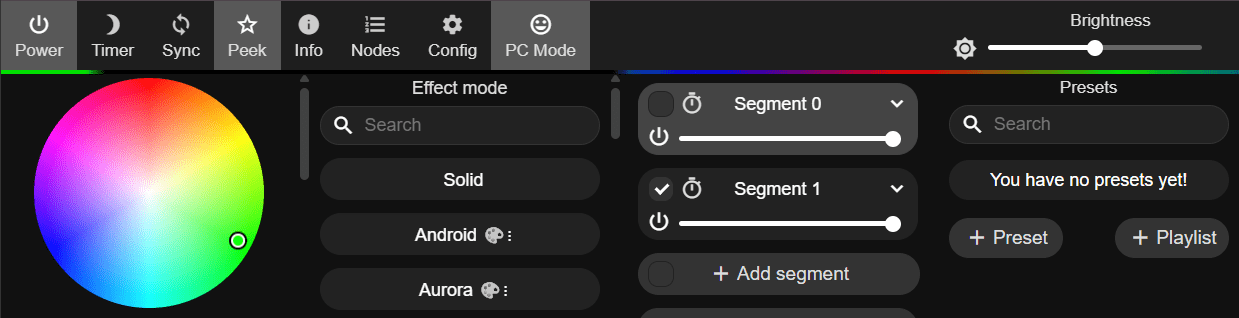
And finally – I only just discovered THIS… on the control panel under PEEK you can enable a colour bar (under the top menu items) to ive you a simple preview of what your LED output will look like – as you see below, I’ve set up two segments – left half is using one effect, right half is using another. Neat.
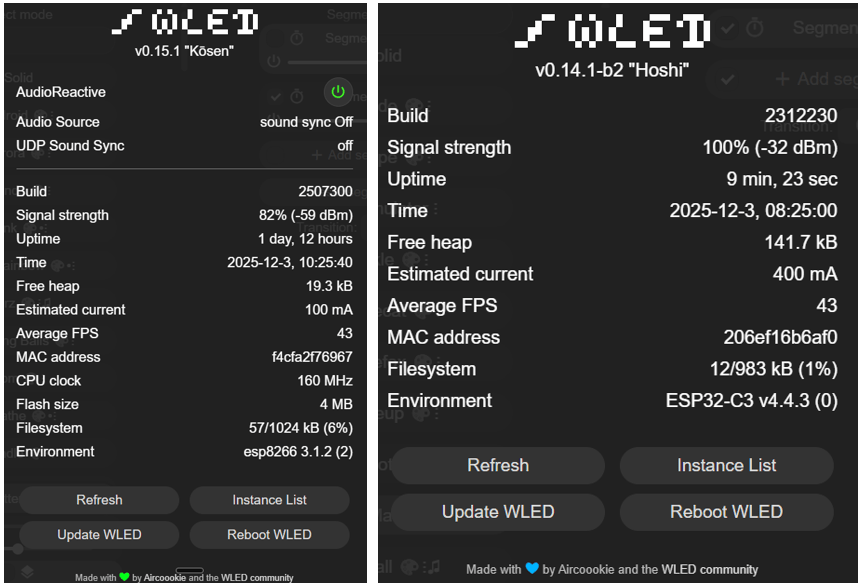
While the official WLED Flasher offered version 0.15.1 of WLED, the Carenuity ESP32-C3 version at the time of writing only offered 0.14.1-b2 – all of this will change in time of course. On ESP8266 it’s a no-brainer – official installer… and don’t forget you CAN double up the speed of the ESP8266 using that official installer.
It has to be said – the WLED site https://kno.wled.ge/ is really good. What a URL….
Of interest – as I continue my Christmas lighting – I’ve resurrected a 64*8 array I bought a couple of years ago for outside at Christmas – using an Atom Pico ESP32-based board – which had stopped working. Well, I reflashed the ESP32 and got the scrolling text working again. For a while this was working fine but then I started to lose communication over WiFi – the 512-LED display was scrolling just fine. No matter what, the comms kept failing.
I took one of my newly received AliExpress Wemos D1 (USB-C) and flashed the code onto that and connected that to the exact same display – it’s been sitting here all night running brightly without any issue as I experiment on my PC with different christmas messages. Maybe just a bad ATOM board? I don’t know but while sitting here with this lovely Wemos board running the display, I swapped the setup and data pin to TX (GPIO1) and as predicted – that’s just fine too.

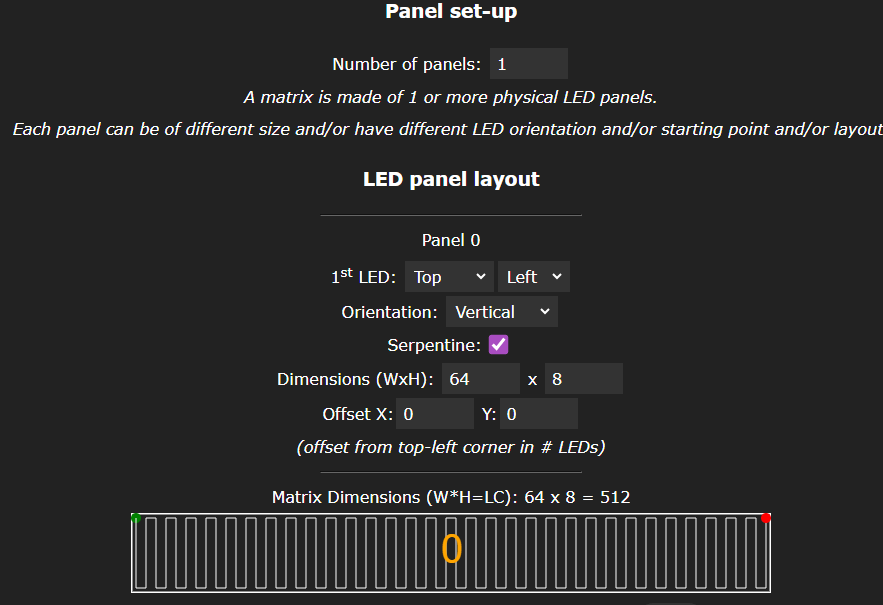
Just for the sake of it I’m parking the setup here. In order to have WLED run my particular type of display, a pair of 32*8 arrays – for a total of 64 RGB LEDS, the setup in WLED is as follows:
Undre LED preferences I have set up 512 LEDS total. Under settings, 2D configuration, set the default “1D strip” option to “2D matrix at which point some options will appear as below… in the image you’ll see the settings needed for my display modules. These are commonly available at AliExpress.
Then in the main WLED panel I’ve set effect mode to scrolling text and I have a segment who’s title is the text I want to appear… I then, on the left, under the colour wheel, set in my case RAINBOW (not, not teh rainbow under the effects section).
Loved this! Amazing how the old ESP8266 still ends up saving Christmas every year 😂. WLED + WS2812 is hard to beat, and TwinkleFox is one of my favourite presets. Thanks for the tip on power draw — easy to forget how quickly LEDs add up.
My wife absolutely loves TwinkleFox.
I’ve reserved the last half dozen or so lights for white glitter… Done. Last video..